
Preview Markdown in Finder, rendered the way GitHub shows it
Press Space on a Markdown file and macOS shows plain text. With Gander, Quick Look shows it the way GitHub does: headings, tables, task lists, coloured code, Mermaid diagrams and math, without opening an editor.

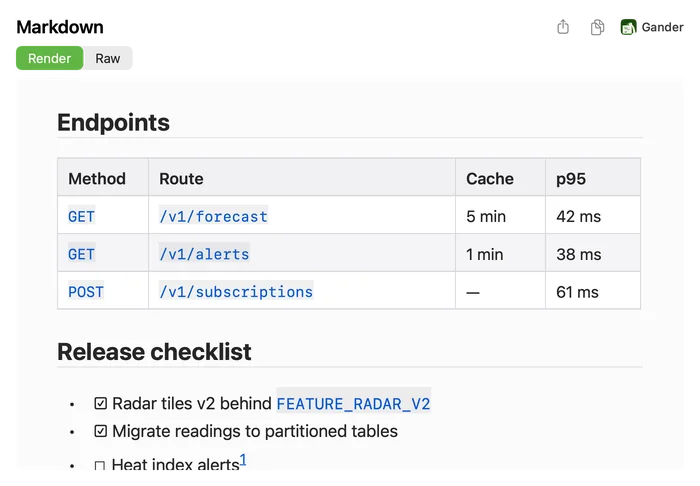
How to do it
Install Gander from the Mac App Store and open it once.
In Finder, select a
.mdor.markdownfile.Press Space. The rendered page opens, and Raw shows the source, with line numbers when you want them.
To read with working links, or to export, Control-click the file and choose Open With › Gander.
Everything GitHub-flavoured Markdown does
Gander follows CommonMark plus GitHub’s extensions, so a README looks in Finder the way it looks on GitHub.
- Tables, task lists (
- [ ]and- [x]), strikethrough and autolinks - Fenced code blocks coloured by language, with long lines kept whole and a copy button on each block
- GitHub alerts (Note, Tip, Important, Warning and Caution) as coloured boxes, and quotes with GitHub’s grey bar
- Math with
$…$and$$…$$, footnotes and:emoji:shortcodes mermaidcode blocks drawn as diagrams inside the page
Light or dark, with copy and thumbnails
The preview follows your Mac’s light or dark appearance. The copy button copies the rendered text with its formatting, ready to paste into Mail or Notes, and on Raw it copies the source. In Finder’s icon and gallery views, Markdown files get a thumbnail of their first page.
What Quick Look can’t do
Quick Look previews can’t load pictures, so an image shows as a picture icon and its alt text; the Gander window shows pictures stored on your Mac. On recent macOS a Quick Look preview can’t open links either, so Gander copies the link and says so. Math, footnotes, alerts and emoji can each be switched off in the Gander window.
Questions
Why does Quick Look show my Markdown as plain text?
macOS has no Markdown renderer for Quick Look, so it shows .md files as text. A Quick Look extension such as Gander adds one. After installing it, open Gander once and check that it is on in System Settings › General › Login Items & Extensions › Quick Look.
Which files does Gander render as Markdown?
.md, .markdown, .mdown and .markdn files, wherever they are: a project folder, Downloads, iCloud Drive or an external drive.
Does Gander change or upload my files?
No. It reads the file only to draw the preview, it has no networking code, and its App Store privacy label is Data Not Collected.
Can I turn a Markdown file into a PDF or a Word document?
Yes, from the same preview: see Markdown to PDF or Word.
Try it on your own files
Gander is free on the Mac App Store, with no in-app purchases, no subscription and no account, and nothing you preview leaves your Mac.