
A fast JSON viewer in Finder, for JSONC and JSON Lines too
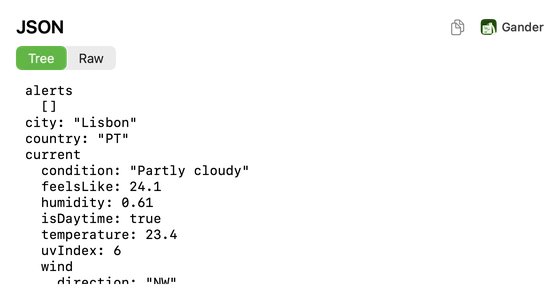
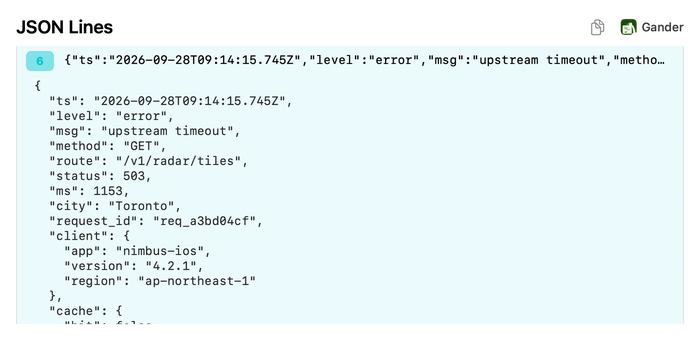
Press Space on a .json file and Gander opens it at once, even a large one, with a Tree of keys and values and the Raw text. Files with comments and trailing commas, such as tsconfig.json or .jsonc, work as well, and JSON Lines logs show one record per line.
How to do it
Install Gander from the Mac App Store and open it once.
Select a
.json,.jsonc,.jsonlor.ndjsonfile in Finder and press Space.Switch between Tree and Raw. In JSON Lines, click a line number to expand that record.
Tree and Raw
Tree shows the structure as nested keys and values. Raw keeps the file exactly as written, comments included, with line numbers one click away. The copy button copies whichever view is on screen, and files up to 1 MB open whole.
JSON with comments
Gander reads strict JSON first and, if that fails, reads the file again with JSON5 rules. So comments and trailing commas, in .jsonc files and in .json files such as tsconfig.json, still get a Tree. A broken file still opens, as highlighted text.
JSON Lines and NDJSON logs
.jsonl and .ndjson files show one record per line, so a log with thousands of entries opens in a moment. Click a record’s line number to expand it as indented JSON, in the file’s own key order, and click again to fold it. package.json gets its own overview of the name, version, scripts and dependencies.
Questions
How large a JSON file can Gander open?
Files up to 1 MB open whole, in about a tenth of a second. A longer file shows its first 1 MB, with a note saying so.
Does Gander change my JSON?
No. Raw shows the file exactly as written, and Gander never writes to it.
Do JSON files get Finder thumbnails?
Yes. JSON, JSONC and JSON Lines files get thumbnails of their coloured text in Finder’s icon and gallery views.
Try it on your own files
Gander is free on the Mac App Store, with no in-app purchases, no subscription and no account, and nothing you preview leaves your Mac.