
Read any SQL query neatly laid out, without changing the file
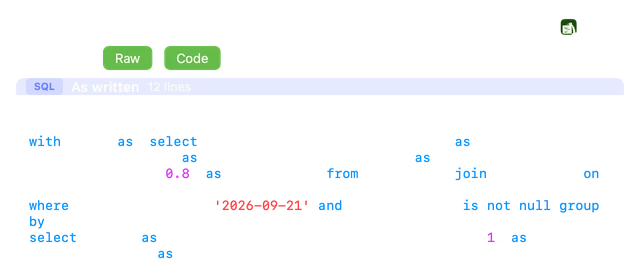
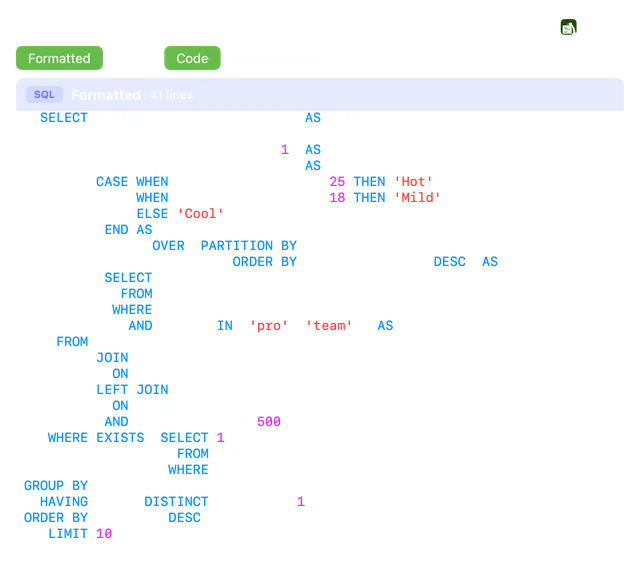
A query written on three long lines is hard to read. Press Space on a .sql file and Gander lays it out with the keywords right-aligned in one column, so every clause, join and condition lines up. The file itself never changes: Raw shows it as written.
How to do it
Install Gander from the Mac App Store and open it once.
Select a
.sqlfile in Finder and press Space.Read the Formatted tab, or switch to Raw for the file as written. Turn on line numbers when you need them.
The river layout
Gander uses the classic “river” style: clause keywords such as SELECT, FROM, JOIN, WHERE and GROUP BY are right-aligned, so everything after them starts on one column.
- One selected column per line, with the aliases lined up
- Joins with their ON conditions, and one condition per line with AND and OR in the river
- CTEs, subqueries, CASE expressions and window functions laid out to match
- Keywords in capitals, while names, quoted names and strings keep their case
Safe by design
Only spacing and keyword case change. Each statement is checked word by word against the original and kept as written if anything would differ. Code Gander can’t lay out safely, such as procedures, dbt {% %} blocks and psql scripts, is shown as written.
Coloured, and in thumbnails too
Both views are syntax-coloured, and Finder thumbnails show the formatted query, so you can tell your queries apart at a glance.
Questions
Does Gander rewrite my .sql file?
No. The layout is only on screen. Gander never writes to the file, and Raw shows it exactly as written.
Which SQL does it lay out?
The layout follows the shape of the query rather than one dialect: SELECT, INSERT, UPDATE, DELETE and WITH statements, along with words such as QUALIFY and SQL Server’s GO batches. Anything it can’t lay out safely stays as written.
Can I copy the formatted query?
Yes. The copy button copies the view on screen: the laid-out query on Formatted, the original on Raw.
Try it on your own files
Gander is free on the Mac App Store, with no in-app purchases, no subscription and no account, and nothing you preview leaves your Mac.