
Check a .env file without putting secrets on screen
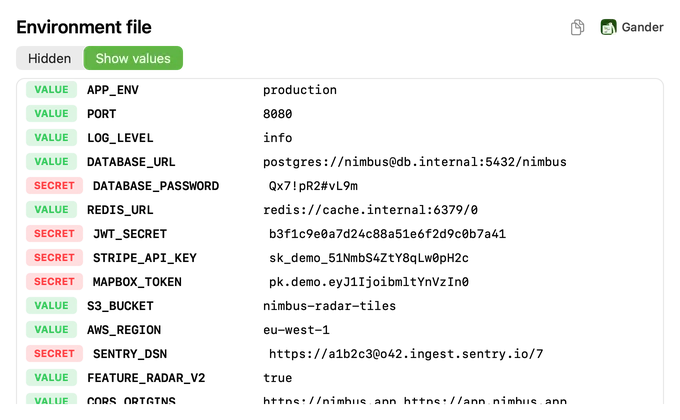
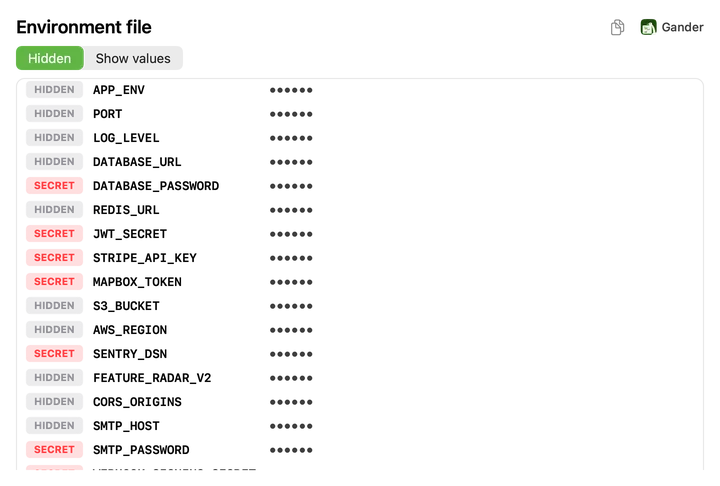
Open a .env file in an editor and every password and API key is on screen, in front of anyone nearby or on a screen share. Gander’s Quick Look preview shows the keys and hides every value until you choose Show values.
How to do it
Install Gander from the Mac App Store and open it once.
Select a
.envfile in Finder and press Space. If you can’t see the file, press ⇧⌘. (Command-Shift-Period) to show hidden files.Read the keys, and choose Show values only when you need to see them.
Hidden by default
Values stay hidden until you ask for them:
- Every value is masked when the preview opens
- Likely secrets are marked SECRET: passwords, tokens, API keys, private keys and connection strings with a password
- Copying from the hidden view never copies a real value
- Finder thumbnails show keys only, never values
Read the way dotenv reads it
Gander reads the file the way dotenv does: quoted values can span lines, so a PEM private key is one entry; double quotes take escapes; and an unquoted value ends where a # comment starts.
Which files
.env, .env.local, .env.production and any other .env.* file, plus names that end in .env. Nothing is uploaded: Gander has no networking code.
Questions
Is it safe to preview a .env file during a screen share?
Yes, as long as you don’t choose Show values: the preview shows the keys and masks every value, and likely secrets are marked SECRET.
Does Gander store or send my secrets?
No. It reads the file only to draw the preview, keeps nothing, and has no networking code.
Why can’t I see my .env file in Finder?
Files whose names start with a dot are hidden. Press Command-Shift-Period (⇧⌘.) in Finder to show them.
Try it on your own files
Gander is free on the Mac App Store, with no in-app purchases, no subscription and no account, and nothing you preview leaves your Mac.