
Read Jupyter notebooks on your Mac without starting Jupyter
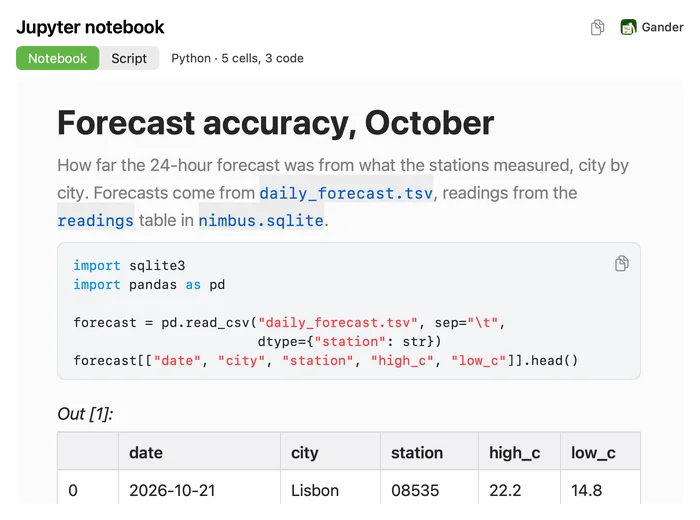
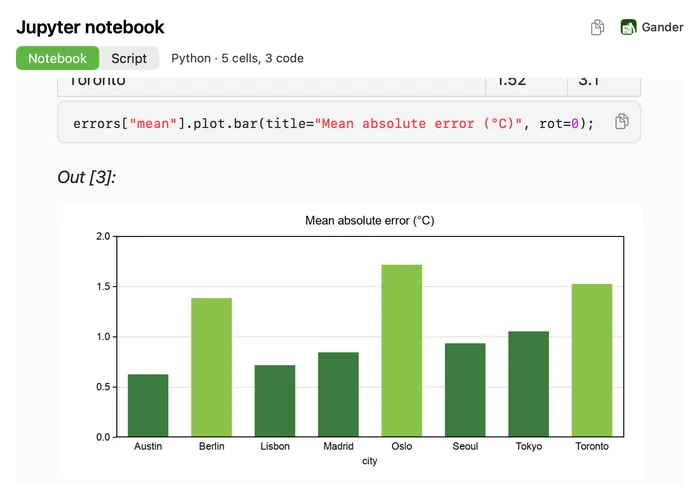
An .ipynb file is JSON, so without Jupyter it’s hard to read. With Gander you select it in Finder and press Space: the notebook appears the way you’d read it, with its outputs, tables and charts, and no Python, kernel or browser involved.
How to do it
Install Gander from the Mac App Store and open it once.
Select an
.ipynbfile in Finder and press Space.Read the Notebook tab, or switch to Script to see all the code as one script.
Outputs included
Gander shows what was saved in the notebook the last time it ran:
- Markdown cells, with headings, lists, tables, math and pictures
- Code cells coloured in the kernel’s language, such as Python or R
- Printed text and results, with terminal colour codes removed
- pandas DataFrames as tables, and charts (PNG, JPEG, GIF or SVG) drawn inside Quick Look
- Errors with their traceback
The Script tab
Script turns the notebook into one script: every code cell in order, with the Markdown cells as comments, coloured in the notebook’s language. It’s a quick way to review what a notebook does before you run it.
Thumbnails and limits
In Finder’s icon and gallery views, notebooks get a thumbnail of their first cells. Gander shows saved outputs and never runs code. Long outputs are shortened (120 lines of text, 60 table rows and 60 pictures), and notebooks over 40 MB aren’t read.
Questions
Does Gander run the notebook?
No. It shows the notebook as it was saved, with the outputs from its last run. Nothing is executed, so previewing a notebook is safe.
Do I need Python or Jupyter installed?
No. Gander reads the notebook file itself and draws the charts saved in it.
Which notebooks work?
Notebooks in nbformat 4, the format Jupyter, JupyterLab, VS Code and Google Colab save, and the older nbformat 3.
Try it on your own files
Gander is free on the Mac App Store, with no in-app purchases, no subscription and no account, and nothing you preview leaves your Mac.